3. System Scope and Context
This chapter describes the system’s boundaries, its users, and its interactions with external systems.
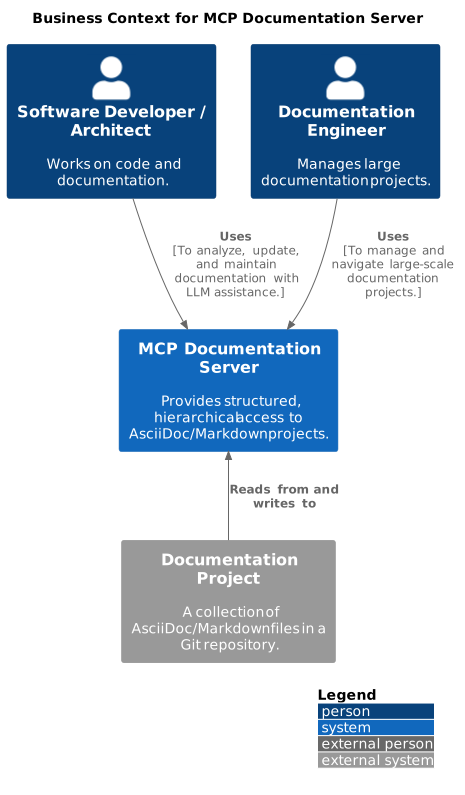
3.1 Business Context
From a business perspective, the MCP Documentation Server acts as a specialized middleware that enables technical users to interact with documentation projects more effectively. It abstracts away the complexity of file-based document structures.
3.2 Technical Context
On a technical level, the system is accessed by an MCP-compliant client. It interacts directly with the file system to read documentation source files and write back modifications. It is also aware of the version control system (Git) to ensure workflow compatibility.
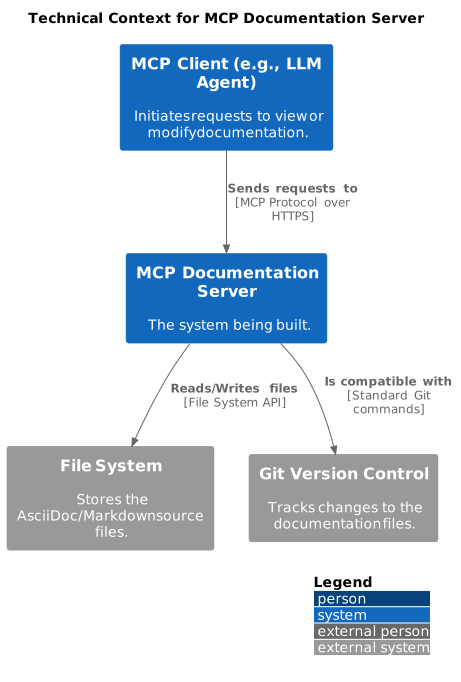
Note: The diagram above shows the original design. Section 3.3 documents the actual technical dependencies in the implemented system (Oct 2025).
3.3 Technical Dependencies (Actual Implementation)
The implemented system integrates with several external libraries and systems beyond the original design.
External Libraries
| Library | Purpose | Version | ADR Reference |
|---|---|---|---|
watchdog |
File system event monitoring for auto-refresh |
3.1.0+ |
ADR-007 (implicit) |
pytest |
Test framework for comprehensive test coverage |
8.0+ |
ADR-008 |
FastAPI |
Web server framework for HTTP API and web UI |
0.100+ |
Original design |
uvicorn |
ASGI server for FastAPI |
0.20+ |
Original design |
difflib |
Standard library for diff generation |
stdlib |
Original design |
Integration Points
File System Integration: - Read: Project discovery, document parsing, content access - Write: Atomic file updates via backup-and-replace strategy (ADR-004) - Watch: Auto-refresh via watchdog library detecting file modifications
Git Compatibility: - System preserves Git-friendly workflows (human-editable files) - No lock files or binary formats introduced - Commit-friendly: Changes are atomic and file-based
Testing Infrastructure: - Pytest for unit and integration tests - 82% code coverage across modules - Test fixtures for document parsing and file operations
Web Browser Integration:
- Auto-launches default browser on startup
- Uses webbrowser module (cross-platform)
- Serves web UI on localhost (ports 8080-8099)
System Boundaries
What’s Inside the System: - MCP protocol handler (JSON-RPC over stdio/HTTP) - Document parser (AsciiDoc/Markdown) - In-memory structure index - Content editor (atomic writes) - File watcher (auto-refresh) - Web server (FastAPI-based)
What’s Outside the System: - AsciiDoc/Markdown source files (file system) - Version control (Git) - MCP clients (Claude Desktop, custom clients) - Web browsers (for web UI access) - File system events (OS-level inotify/FSEvents)
Mental Model: "The server is a smart cache layer between LLMs and files"
The system doesn’t own the documentation - it provides intelligent access to files owned by the file system and managed by Git. This preserves human editability while enabling LLM efficiency.
Feedback
Was this page helpful?
Glad to hear it! Please tell us how we can improve.
Sorry to hear that. Please tell us how we can improve.