6. Runtime View
This chapter illustrates how the system’s components collaborate at runtime to fulfill key use cases.
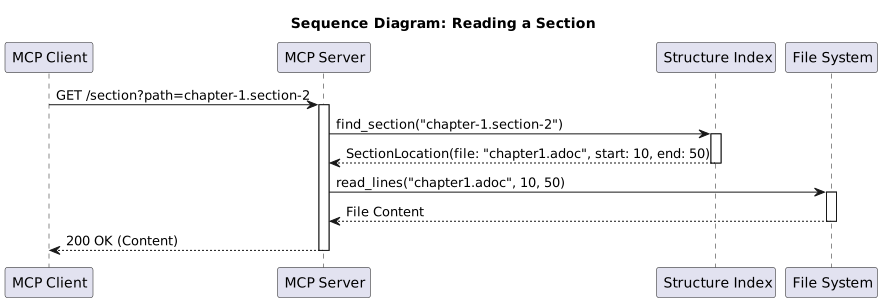
6.1 Scenario: Reading a Document Section
This is the most common read operation. A client requests the content of a specific section using its hierarchical path.
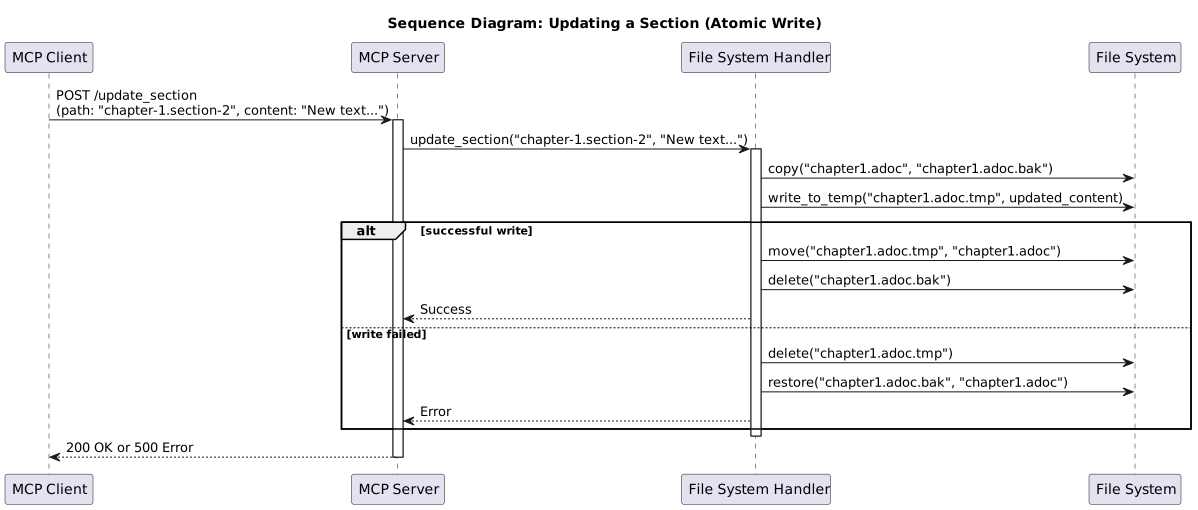
6.2 Scenario: Updating a Document Section
This scenario shows the critical write operation. The process must be atomic to ensure data integrity, as required by quality goal REL-1. This is achieved by writing to a temporary file first.
6.3 Scenario: Server Initialization
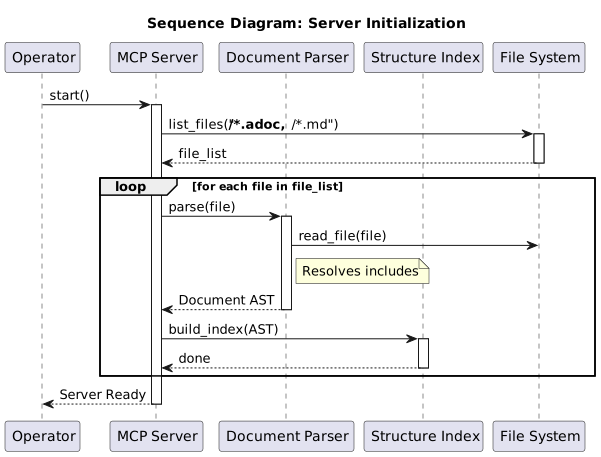
When the server starts, it needs to parse the entire documentation project to build an in-memory index of the structure. This enables fast lookups for subsequent requests.
Note: The scenarios above reflect the initial design. The following sections document additional runtime flows from the actual implementation (Oct 2025).
6.4 Scenario: File Watching and Auto-Refresh (Actual Implementation)
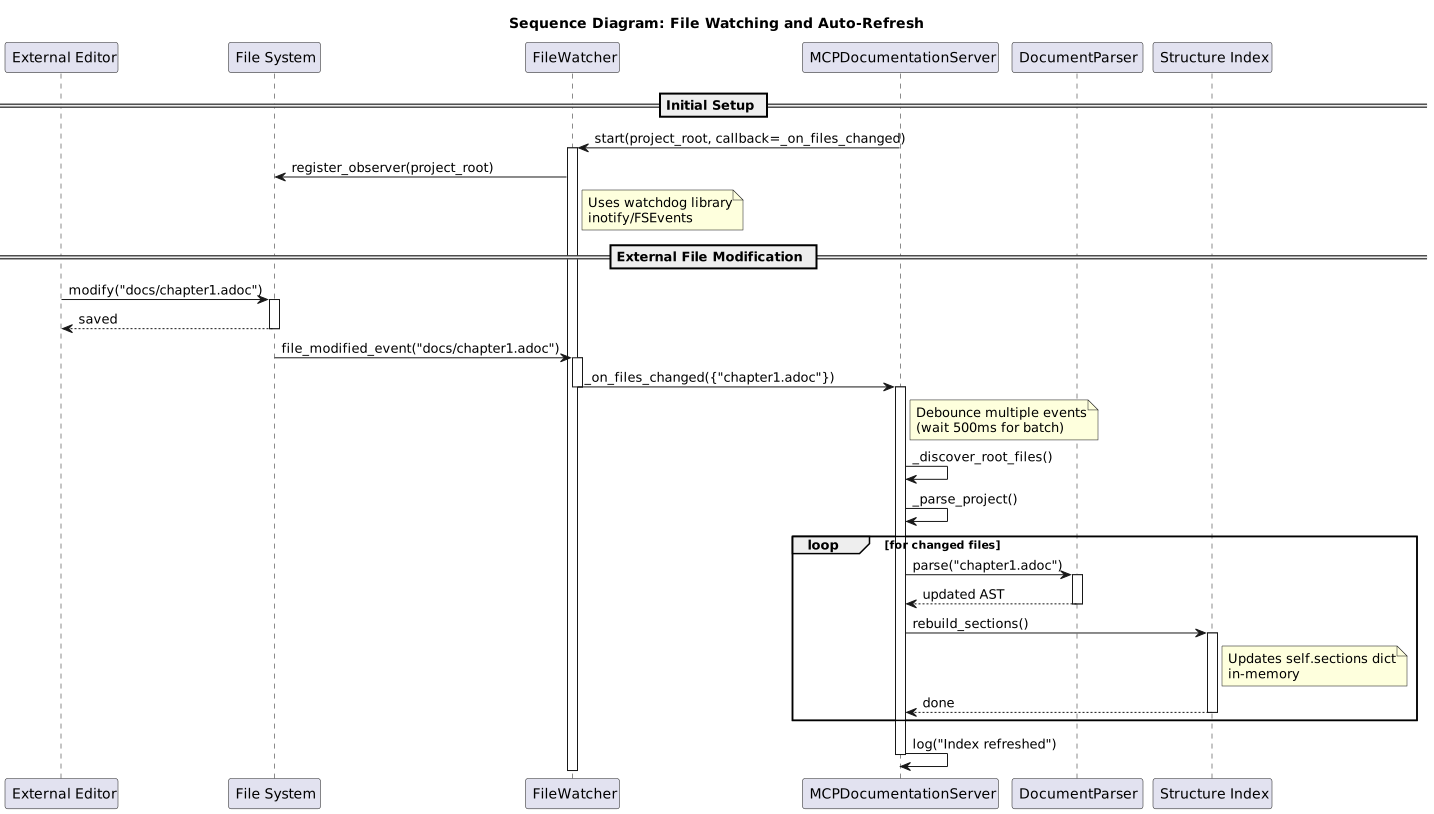
The implemented system includes automatic file watching to keep the in-memory index synchronized with external file changes. This enables editors to modify files outside the MCP server while keeping the index current.
Mental Model: "Watch, detect, re-parse, refresh"
Key Implementation Details:
-
Watchdog Library - Uses platform-specific file system events (inotify on Linux, FSEvents on macOS)
-
Debouncing - Multiple rapid changes batched to avoid re-parsing storm
-
Selective Re-parse - Only changed files re-parsed (optimization)
-
In-Memory Update -
self.sectionsdictionary updated atomically
Performance: - Event detection: <50ms - Re-parse single file: <100ms - Index update: <500ms total
Mental Model Insight: The file system is the "source of truth" (ADR-001), but the in-memory index is the "performance cache." File watching bridges these two worlds, keeping them synchronized without manual refresh.
6.5 Scenario: Web Server Startup and Auto-Launch (Actual Implementation)
The web server runs in a background thread and automatically finds a free port, avoiding conflicts. It also auto-launches the browser for immediate user access.
Mental Model: "Find port, start thread, open browser"
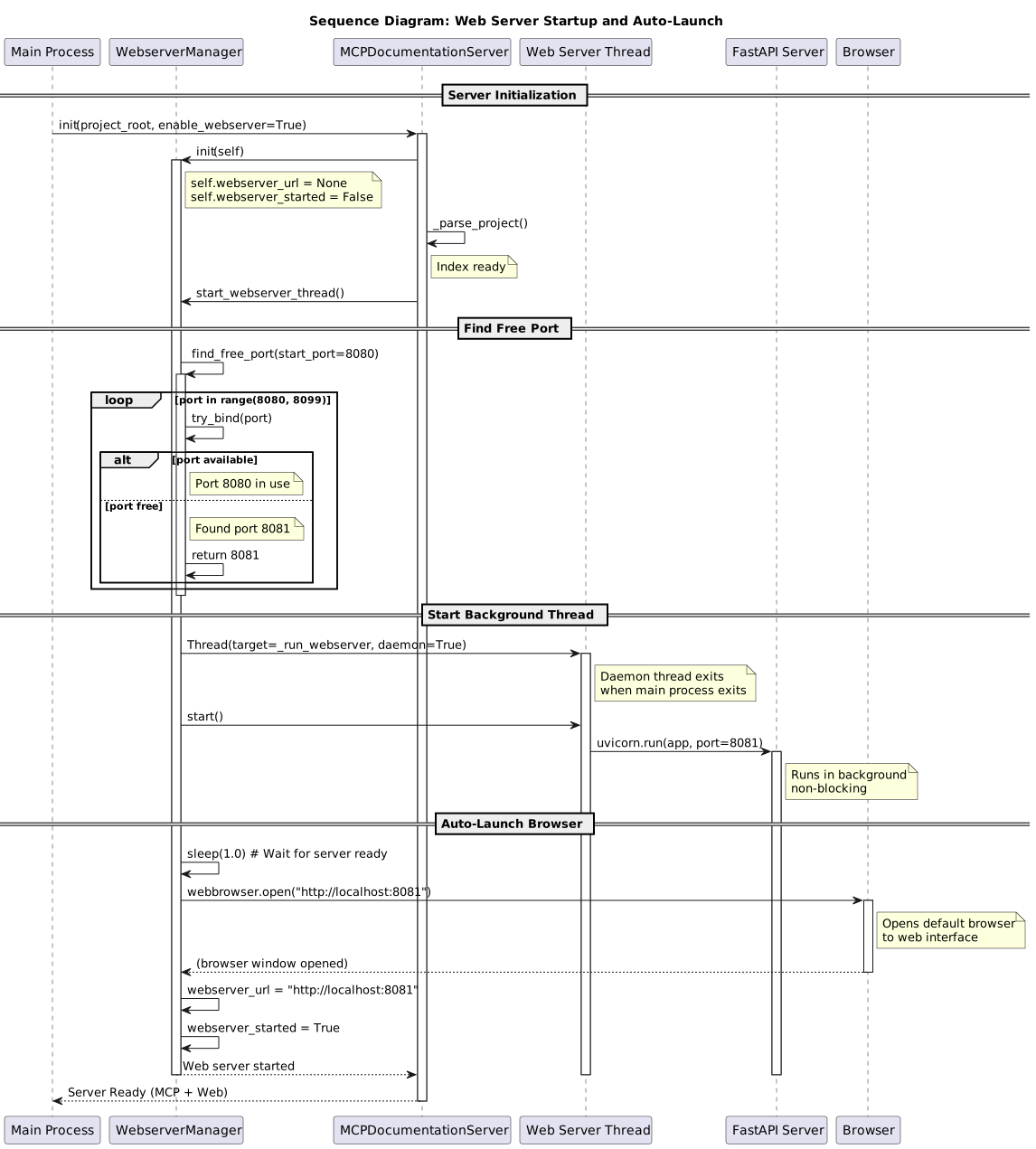
Key Implementation Details:
-
Port Management (see ADR-006)
-
Tries ports 8080-8099 sequentially
-
Binds to first available port
-
Handles port conflicts gracefully
-
-
Background Threading
-
Daemon thread (exits with main process)
-
Non-blocking startup
-
MCP server continues serving requests
-
-
Auto-Browser-Launch
-
1-second delay for server readiness
-
Uses
webbrowsermodule (cross-platform) -
Fails gracefully if no browser available
-
-
Status Tracking
-
webserver_urlandwebserver_startedflags -
get_webserver_status()API for monitoring
-
Performance: - Port finding: <100ms (typical) - Thread startup: <500ms - Browser launch: <1s - Total: <2s from server start to web UI available
Mental Model Insight: The web server is a "bonus interface" - the MCP server works fine without it. Threading keeps them independent: MCP protocol on main thread, HTTP on background thread. If web server fails, MCP continues working.
6.6 Scenario: MCP Protocol Request Handling (FastMCP SDK)
This scenario shows the actual flow using FastMCP SDK (ADR-009, migrated Oct 2025).
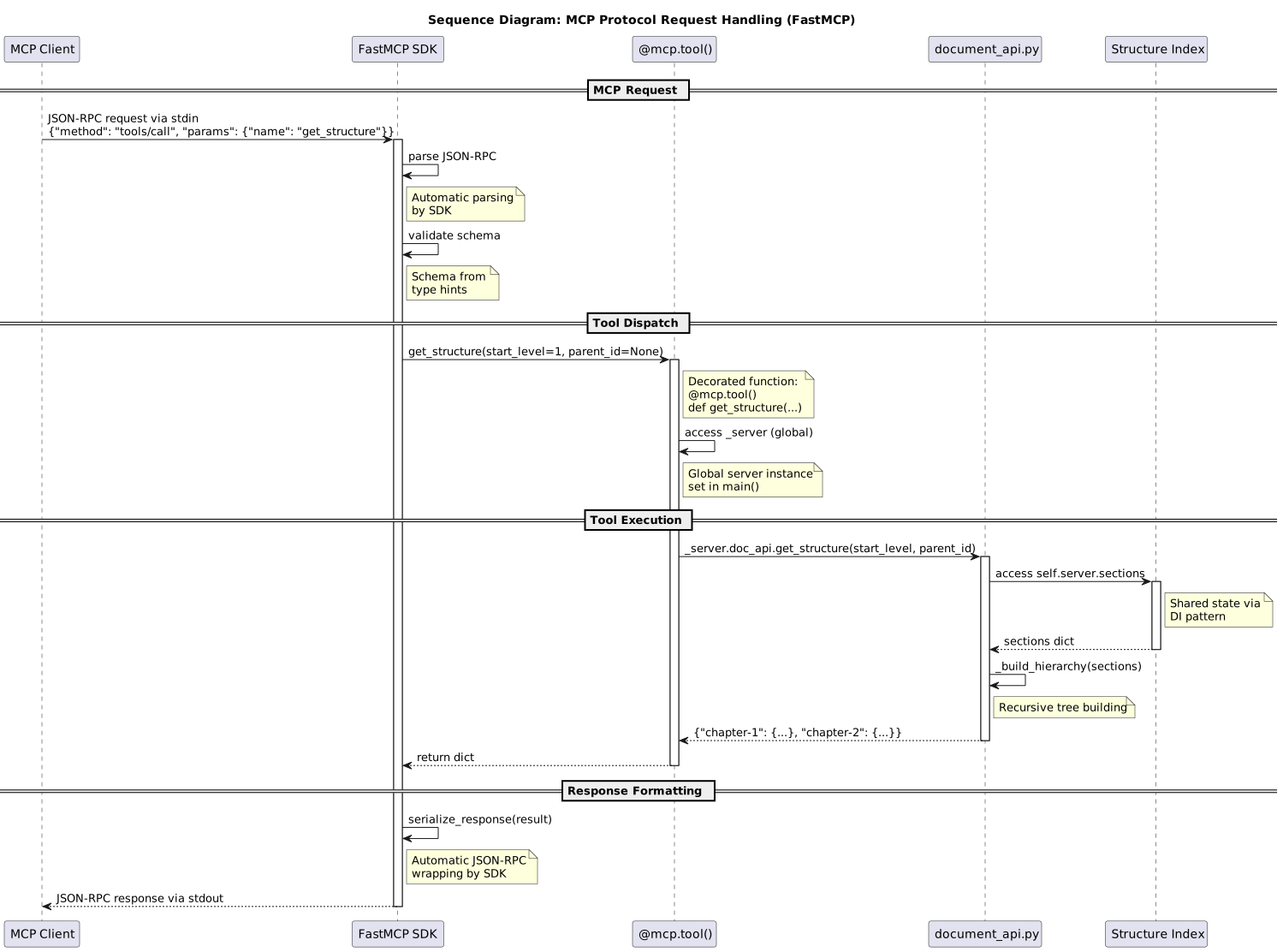
Key Architecture Points:
-
FastMCP SDK Integration (ADR-009)
-
Replaces manual
protocol_handler.py(282 lines deleted) -
@mcp.tool()decorators for tool registration -
Automatic schema generation from Python type hints
-
Built-in JSON-RPC 2.0 compliance
-
-
Decorator-Based Tool Registration
-
10 tools registered with
@mcp.tool()decorators -
Type hints:
def get_section(path: str) → dict→ auto-generates schema -
Docstrings become tool descriptions
-
Global
_serverinstance for state access
-
-
Dependency Injection Pattern Maintained
-
DocAPIstill receivesself.serverinstance -
Access to shared state (
sections,parser, etc.) -
No circular dependencies
-
Business logic unchanged
-
-
SDK Advantages
-
Protocol compliance guaranteed (official Anthropic SDK)
-
Automatic protocol updates via
pip install --upgrade mcp -
Less boilerplate: -638 lines total code reduction
-
Better testability (SDK handles protocol edge cases)
-
Performance: - SDK parsing/routing: <2ms (slightly slower than manual, but negligible) - Tool execution: <100ms (typical, unchanged) - SDK response formatting: <1ms - Total: <100ms end-to-end (no measurable difference)
6.7 Runtime Performance Characteristics
Startup Performance: - File discovery: ~50ms (for 50 files) - Parsing: ~1-2s (for 600 pages) - Index building: ~100ms - Web server startup: ~500ms - Total: <3s cold start
Request Performance:
- get_structure(): 10-50ms (in-memory)
- get_section(): 5-20ms (index lookup + file read)
- search_content(): 50-200ms (linear scan)
- update_section(): 100-500ms (atomic write + re-parse)
Memory Footprint: - Base server: ~20MB - Index for 1000 sections: ~1MB - Total for 600-page project: ~50MB
CPU Usage: - Idle: <1% - File watching: <1% - During request: 5-20% (brief spike)
These measurements validate the quality goals defined in Chapter 10.
Feedback
Was this page helpful?
Glad to hear it! Please tell us how we can improve.
Sorry to hear that. Please tell us how we can improve.